
You write the code. Bench does everything around it.
A Mac app for microcontroller firmware. Bench finds and names your boards, builds, flashes, shows serial output, decodes crashes, plots values from your logs, and reads what’s actually on a board. Your editor stays your editor.
For ESP32, Raspberry Pi Pico, STM32 and nRF boards. Mac only, on purpose.
Bench isn’t out yet, so it isn’t on sale. When it is, you can try it free for 30 days, then buy it for US $79 once, plus sales tax or VAT where it applies.
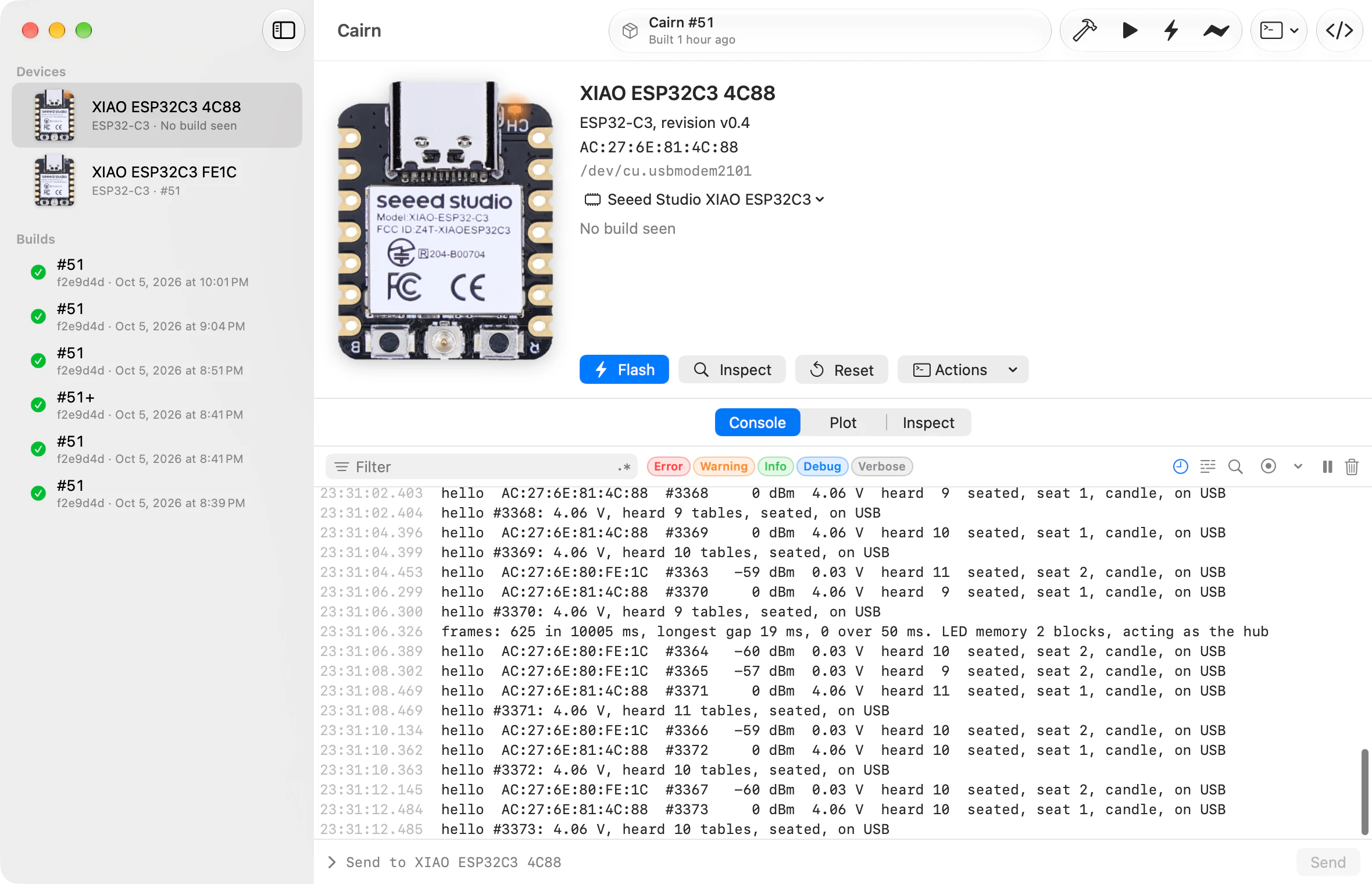
Every board on your desk, by name.
Plug a board in and it shows up within a second, named after the end of its MAC address. Rename it and the name sticks, on any port, any cable, in any project. Beside each name is the build it’s running: #51, or #51+ when it was built with uncommitted changes.
Bench never resets a board unless you asked for something that needs it. If another app has the port open, Bench says which one, and picks the board back up when it lets go.
Build
Every build gets a number and a commit.
⌘B builds with arduino-cli, ESP-IDF or a command of your own. With stamping on, Bench first writes the build number and commit into a small header for your firmware to print. A build with uncommitted changes gets a plus.
Last build: #51, f2e9d4d, 17 s.
Cairn has uncommitted changes.
Errors and warnings land in an Issues list, and clicking one opens your editor at that line. Recent builds keep their images and flash layout, so you can flash one again later or decode a crash against it.
Flash
From built to running in one keystroke.
⌘U flashes the selected board with your latest good build; ⌘R builds first. Bench owns the port, so there’s no monitor to close. The board resets and its boot lines show up in the same console.
XIAO ESP32C3 FE1C
Running #51 (f2e9d4d)
- 0x0Bootloader19 KB
- 0x8000Partition table3 KB
- 0xe000OTA data8 KB
- 0x10000App1.3 MB
Waiting to flash.
- ⌘U
- Flash
- ⌘R
- Build, then flash
- ⇧⌘U
- Flash All
Flash All writes every connected board for the project, up to six at once. Boards that last ran another project, or have a different chip, are skipped with the reason.
Inspect
What’s actually on the board.
⌘I reads a board’s flash with no help from its firmware: the chip, its MAC, the partition table drawn to scale, which OTA slot is active, and which of your builds sits in each slot.
- Chip
- ESP32-C3, revision v0.4
- MAC
- AC:27:6E:81:4C:88
- Flash
- 4 MB
- Crystal
- 40 MHz
- Features
- WiFi, BLE
Explore
Serial output that survives resets.
dBm, from XIAO ESP32C3 FE1C, live
Crashes, decoded
When a board panics, a card appears in the console with the backtrace decoded to function, file and line, against the build that crashed. Click a frame and your editor opens there.
Plot any number
Plot any number that turns up in your logs, live or from a recording, and export it as CSV.
Record after the fact
Record a session on purpose, or save the last 5, 15 or 60 minutes once something odd has already happened.
Keep your editor. Bench opens files in it.
Build issues and crash frames open in your editor at the right line. Turn it on for a
project and Bench keeps compile_commands.json and .clangd
up to date after each build, so clangd understands your sketch. For Zed, VS Code,
Cursor and Windsurf it can add Build, Run, Flash and Monitor tasks too.
- Zed
- VS Code
- Cursor
- Windsurf
- Sublime Text
- Nova
- CLion
- TextMate
- BBEdit
- Xcode
The bench command
- bench build
- Build, with the log in your terminal.
- bench run --monitor
- Build, flash, then stream the board’s serial output.
- bench flash --all
- Flash All, from the terminal.
- bench monitor
- Stream serial output until you press Control-C.
- bench devices
- List boards: name, MAC, chip, port and build.
Install it from Settings > Command Line. It finds the project from the folder you’re in, and starts Bench in the background if it isn’t running.
Also on the bench
Signed packages
Make a P-256 key in Settings and it stays in your Keychain. Bench writes the public keys into a C header for your firmware, and a Swift file if there’s a companion app, then signs each build into a package the firmware can verify.
Your scripts, on a board
Put your own commands in the Actions menu. Bench lets go of the port while one runs, streams its output into the console, then picks the board back up.
Boards outside a project
A window for any board: watch it, inspect it, or flash a
.binsomeone sent you. Bench checks the chip before it writes.A starting point
File > New Project creates a starter Arduino sketch or ESP-IDF project, ready to build.
No surprises in git
Bench writes
bench.jsonand only the files you turn on. It never edits.gitignore, and asks before replacing a file it didn’t write.
Make it yours.
Bench isn’t out yet, so it isn’t on sale. This is how buying will work once it is.
Try Bench free for 30 days: the whole app, with no account. After the trial, boards, Console and Inspect keep working; Build and Flash need a license.
Buy it once and it’s yours to keep. A license comes with a year of updates and support.
It will be US $79 once, plus sales tax or VAT where it applies. Questions before then? hello@usefae.com
What it needs
Bring your boards and your editor. Bench can fetch the Arduino tools itself.
- System
- macOS 26 or later
- Mac
- Apple silicon or Intel
- Boards
- ESP32 chips, the ESP8266, Arduino AVR, SAMD, UNO R4, GIGA and Portenta, Raspberry Pi Pico and Pico 2, nRF52, STM32, Teensy 4, and any board arduino-cli supports
- Builds with
- arduino-cli, ESP-IDF, or your own command
- USB
- Native USB, CP210x, CH340, CH343, CH9102, FTDI, PL2303
- Editor
- Any
- Status
- Coming soon